Pages

Saturday, 20 April 2013

How to transfer existing table data into new table in SQL server?

We can easily transfer/copy one SQL table data into new SQL table without creating table definition using SELECT-INTO-FROM query format.
Suppose I have one SQL table named Employee with lots of data, now if I want to replicate Employee table into new table named Employee_New. So using below query we can easily achieve our task:  
Syntax:
SELECT * INTO [New_Table_Name]
FROM [Existing_Table_Name]
Example:
SELECT * INTO Employee_New
FROM Employee

Sunday, 31 March 2013

How to Right Align Numeric Values in Result Panel in SQL Server?

Generally we apply right alignment to numeric values in our project for easily access and its one of convention to apply right align for numeric. We can also apply this in SQL.

Steps:
1) Open SSMS à Tools à Options..
2) Query Result à SQL Server à Result to Text
3) Check ‘Right align numeric values’ à save it and see result by executing query in new Query Window.
Note: It only works for ‘Result to Text’ option.


Result:

Saturday, 16 March 2013

How to reset/set new Identity value in SQL?

We can easily change, reset, view identity value using DBCC(Database Console Commands) of SQL.

1) To Reset Current Identity Value, if needed
Syntax: DBCC CHECKIDENT ("Table_Name")
Example: DBCC CHECKIDENT ("tblCustomers")
2) To View Current Identity Value
Syntax: DBCC CHECKIDENT ("Table_Name", NORESEED)
Example: DBCC CHECKIDENT ("tblCustomers", NORESEED)
3) To Change Identity Value with New Value
Syntax: DBCC CHECKIDENT ("Table_Name", RESEED, New_Value)
Example: DBCC CHECKIDENT ("tblCustomers", RESEED, 25)

Saturday, 9 March 2013

How to use "UNION" and "ORDER BY" together in SQL?

This is one of tricky question and I love tricky question so I am going to write this post. How if I run below query in sql server:
SELECT TOP 1 * from Employee ORDER BY EmpId ASC
UNION
SELECT TOP 1 * from Employee ORDER BY EmpId DESC
This query result in error due to incorrect position of ORDER BY cause we only use ORDER BY clause to the final result set.
Error Message:


There are many ways to recreate above query without error but the easiest one is following:
SELECT *
FROM (
    SELECT TOP 1 * FROM Employee ORDER BY EmpId ASC) FIRST
UNION
SELECT *
FROM (
    SELECT TOP 1 * FROM Employee ORDER BY EmpId DESC) LAST


Sunday, 24 February 2013

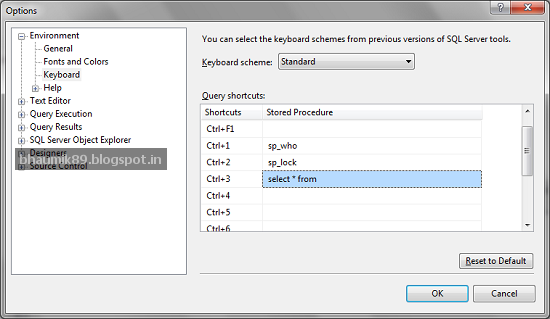
How to make your own keyboard shortcut in SSMS?

Today I am going to show you how to create your own keyboard shortcut in SQL server management studio to increase your productivity in development.

We all write SELECT * FROM query very frequently while using SQL so instead write it we can create it as a keyboard shortcut for quick access. Finally it’s depends on you which query you uses most frequently and create shortcut according to it.

STEPS:
1) Open SQL server management studio.
2) Goto Tools à Options.. à Environment à Keyboard.
3) Select your shortcut and enter your query.


How To Use:
Now in Query editor, you need to just type [Table_Name] and select that [Table_Name] then just press shortcut key that you create. That’s it. Enjoy.!!


Saturday, 16 February 2013

LEN vs DATALENGTH in SQL Server

LEN() Function: It will return number of character in string that you mention without considering trailing space.

DATALENGTH() Function: It will return number of bytes used to represent the expression. So it will consider space as well in counting.

Please take a look at below image for more idea:


Quick way to put and use your most reusable code.

Today i am going to show one tips of visual studio which i love most. This tips related to quick access of most usable/common code that we used more frequently. We generally waste time to find code across pages and project that we need actually while development so it’s better to save most frequently used code in Toolbox of Visual Studio. You can just Drag your block of code and Drop into toolbox which shown in below figure:


So when you need this code just Drop them into page from toolbox rather then search it out across many pages and projects. You can also rename it if you have many code block in toolbox.

Happy Coding!!