Pages

Sunday, 24 February 2013

How to make your own keyboard shortcut in SSMS?

Today I am going to show you how to create your own keyboard shortcut in SQL server management studio to increase your productivity in development.

We all write SELECT * FROM query very frequently while using SQL so instead write it we can create it as a keyboard shortcut for quick access. Finally it’s depends on you which query you uses most frequently and create shortcut according to it.

STEPS:
1) Open SQL server management studio.
2) Goto Tools à Options.. à Environment à Keyboard.
3) Select your shortcut and enter your query.
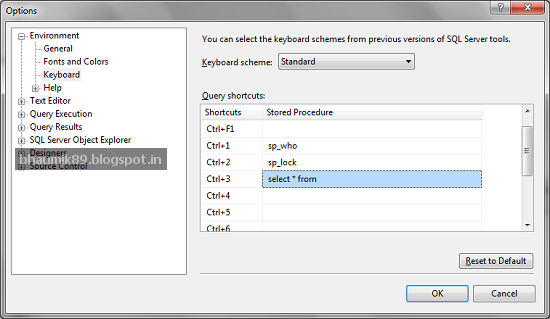


How To Use:
Now in Query editor, you need to just type [Table_Name] and select that [Table_Name] then just press shortcut key that you create. That’s it. Enjoy.!!


Saturday, 16 February 2013

LEN vs DATALENGTH in SQL Server

LEN() Function: It will return number of character in string that you mention without considering trailing space.

DATALENGTH() Function: It will return number of bytes used to represent the expression. So it will consider space as well in counting.

Please take a look at below image for more idea:


Quick way to put and use your most reusable code.

Today i am going to show one tips of visual studio which i love most. This tips related to quick access of most usable/common code that we used more frequently. We generally waste time to find code across pages and project that we need actually while development so it’s better to save most frequently used code in Toolbox of Visual Studio. You can just Drag your block of code and Drop into toolbox which shown in below figure:


So when you need this code just Drop them into page from toolbox rather then search it out across many pages and projects. You can also rename it if you have many code block in toolbox.

Happy Coding!!  

Tuesday, 15 January 2013

Delay Function in SQL Server

The Delay function used to execution of a batch in block, stored procedure, or transaction until a specified time or time interval is reached, or a specified statement modifies or returns at least one row.

While executing the WAITFOR statement, the transaction is running and no other requests can run under the same transaction.

Remarks:
Ø  If a query cannot return any rows, WAITFOR will wait forever or until TIMEOUT is reached, if specified.
Ø  WAITFOR statements not used in Views and Cursor.
Ø  When the query exceeds the query wait option, the WAITFOR statement argument can complete without running. You can create a Deadlock by running a query with WAITFOR.

Example:
SELECT GETDATE() CurrentDateTime
WAITFOR DELAY '00:00:05' ---- 5 Second Delay
SELECT GETDATE() CurrentDateTime


Note: You can also perform update, DB Backup and Restore and many important operation easily using this command.


Monday, 14 January 2013

What is X and Z report in POS(Point of Sale)

The format and contents of X report and Z report are mostly same. It may contain following main content and it may vary based on requirement:
1) Date and Time the report was perform
2) Identification Information (Shift/Batch related information)
3) Opening and closing balance
4) Discount, Total sales, Void transaction and many more
5) Tax, promotions, vouchers related information etc

Now the main question is what is the difference between X report and Z report, which is listed below:
X Report
Z Report
It shows current shift/batch information in details without closing shift/batch.
It closed current running shift and open new shift.
User can print it any time in a day to check transaction details.
It’s more preferable to print it at the end of day.

Sunday, 6 January 2013

SET FMTONLY in SQL Server

It returns only SQL table definition to user. It can be used to test the format of the response without actually running the query. It returns the column information only; no rows of data are returned.

Syntax: SET FMTONLY { ON | OFF }

1) SET FMTONLY ON Example:


2) SET FMTONLY OFF Example:


Sunday, 23 December 2012

Fun with GO Command of SQL.

In previous post, I explained using of “GO” command.
In this post i am going to explain how to rename “GO” command and use another word that you want as a batch separator.

STEPS:
Tools à Options…à Query Execution à SQL Server à General.

Suppose if i rename 'GO' to 'MYGO' then it can be use in following way: